
Introduction
Wireless charging is one of those convenient tech innovations that makes our lives easier. No more fumbling with charging cables, just set your phone on the charging pad, and voila! But how does this nifty technology interact with your phone’s battery? Let’s take a look at how wireless charging works and its effects on your battery health.
At its core, wireless charging uses electromagnetic fields to transfer energy between two coils, one in the charging pad and one in your phone. This means no physical connection is required to charge your device, which is both a blessing and a curse. The beauty of wireless charging is in the convenience, but like any technology, there are a few things you should know about how it impacts your phone’s battery over time.
What Happens to Your Battery When You Use Wireless Charging?
Understanding Heat and Its Impact on Batteries
Heat is one of the main factors that affects the lifespan of your phone’s battery. Wireless charging generates more heat compared to wired charging, simply due to the nature of the electromagnetic energy transfer. When your phone heats up, the battery’s internal components work harder, leading to a decrease in overall battery health over time. But don’t panic! It’s not an immediate danger, but it can contribute to wear and tear in the long run.
The good news is that most modern smartphones come with built-in heat management systems to regulate temperature. Still, it’s something to consider, especially if you’re using your phone while it charges wirelessly or placing it on a poorly designed charging pad that lacks cooling features.
Wireless Charging Efficiency vs Wired Charging
Now, let’s talk about efficiency. When you plug your phone into a charger, the power transfer is typically more direct, and as a result, it’s faster and more efficient. On the flip side, wireless charging, although super convenient, is generally less efficient. It takes longer to charge your device because some of the energy is lost in the conversion from electromagnetic waves back into electrical energy.
But, here’s the thing: While wireless charging is slower, the difference in charging speed might not be significant enough to make a huge impact on your daily routine. It’s still a great solution for those looking for a more convenient charging experience.
Charging Cycles and Their Effect on Battery Life
Every time you charge your phone, it counts as a charging cycle. And batteries have a limited number of cycles before their capacity begins to degrade. Whether you’re charging via wireless or wired methods, your phone’s battery is still undergoing these cycles. So, if you’re frequently topping off your charge, whether it’s with wireless charging or a traditional plug-in, you’re still slowly wearing out the battery.
The key to prolonging battery life is avoiding constant deep discharges. Instead, try to top up your battery in smaller, more frequent bursts to help extend its overall lifespan.
How Does Wireless Charging Compare to Wired Charging?
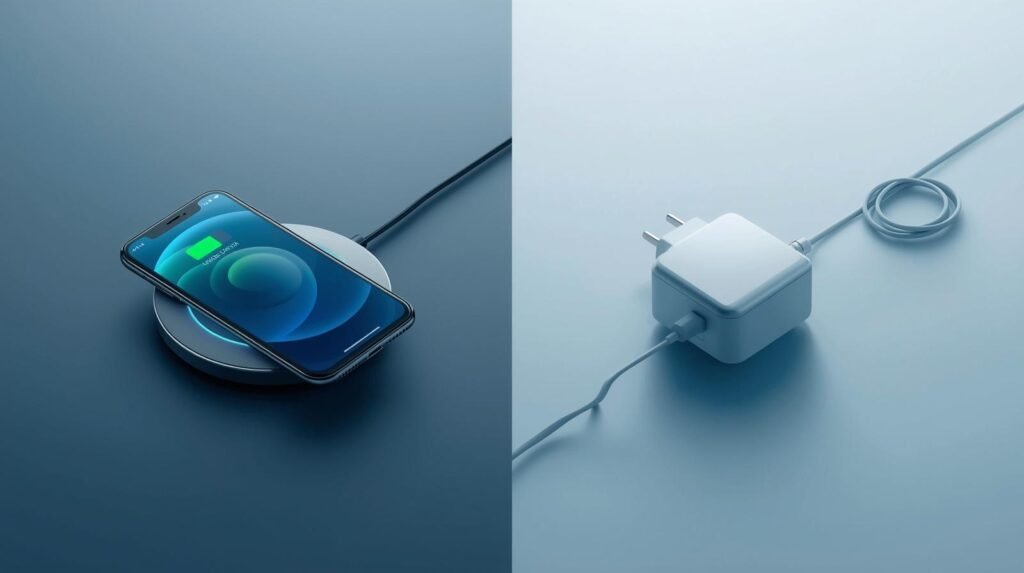
Speed and Efficiency: Wireless vs Wired
When it comes to charging speed, wired chargers usually win. They deliver a more powerful current directly into your device, meaning your phone charges faster. Wireless chargers, on the other hand, lose some energy in the process, making them slower than wired options.
However, it’s important to note that while wireless charging is slower, it’s not a deal-breaker for many. If you don’t mind leaving your phone on the pad for a while, wireless charging can be just as effective, especially for those “top-off” charges during the day.
Heat Generation in Wireless Charging
As we discussed earlier, wireless charging tends to produce more heat. This excess heat can be tough on your phone’s battery if it’s exposed to it for extended periods. Most newer devices come with temperature regulation, but it’s still wise to avoid charging in hot environments or leaving your phone on the pad for too long.
Impact on Battery Longevity
Battery longevity is always a concern, especially with modern smartphones. While wireless charging isn’t inherently bad for your battery, over time, it can contribute to a faster degradation of the battery’s capacity. The heat, slower charge speeds, and increased number of charging cycles can all have a minor cumulative effect on your battery life.
However, don’t stress too much, just be mindful of how often you’re charging and try to keep the phone cool.
Common Myths About Wireless Charging and Battery Damage
Does Wireless Charging Cause Overheating?
It’s a common myth that wireless charging automatically overheats your device. While it’s true that wireless charging generates more heat than wired charging, the truth is that modern phones are designed to handle this extra heat. Devices have built-in thermal management systems, and wireless charging pads are often equipped with cooling solutions. So, as long as you’re using quality equipment, overheating shouldn’t be a big concern.
Can Wireless Charging Overcharge the Battery?
Another myth is that wireless charging can overcharge your phone. While older devices might have had this issue, today’s smartphones are equipped with smartstudent8 charging systems that prevent overcharging. Once your phone hits 100%, it stops charging automatically. So, you can leave your phone on the wireless pad overnight without worrying about damaging the battery.
Is Wireless Charging Slower and Worse for Your Phone?
Indeed, wireless charging is typically slower than wired charging, but it’s not “worse” for your phone. As long as you’re using a reliable wireless charger, it will charge your phone just fine. The key is choosing the right wireless charger that’s compatible with your phone for the best performance.
Tips to Optimize Wireless Charging Without Damaging Your Battery
Choosing the Right Wireless Charger
Not all wireless chargers are created equal. Choose a charger that supports your phone’s charging standards for the fastest, most efficient charging. Wireless chargers with a higher power output (like 15W or 20W) tend to work better with newer devices. Also, look for chargers that have built-in cooling systems to help dissipate heat.
Proper Placement of Your Device on the Charging Pad
To ensure optimal charging, place your phone in the center of the wireless charging pad. If it’s off-center, your phone might charge more slowly or not at all. Always double-check that your phone is positioned correctly to avoid unnecessary strain on your battery.
Maintaining Optimal Temperature While Charging
Heat is the enemy when it comes to battery health. To keep your phone cool while charging, avoid charging in hot environments and remove any cases that might trap heat. Consider charging your phone on a flat surface with good airflow for better cooling.
How to Extend Your Battery’s Lifespan with Wireless Charging
Avoid Frequent Full Discharges
One of the best ways to extend your battery’s lifespan is to avoid letting it fully discharge. Ideally, you should keep your phone’s battery between 20% and 80% to avoid stressing it out. Frequent deep discharges can wear down the battery faster.
Use Quality Chargers and Accessories
Always opt for high-quality wireless chargers and cables. Cheap, low-quality chargers might not only charge your phone slowly but can also produce excess heat that could damage your battery in the long run. Investing in reputable charging accessories is a small price to pay for preserving your phone’s battery.
Keep Your Device Cool While Charging
As mentioned, keeping your device cool is crucial. Try to charge your phone in a cool, well-ventilated area, and avoid charging it in direct sunlight or on soft surfaces like beds, which can trap heat.
Conclusion: Is Wireless Charging Safe for Your Battery?
In conclusion, wireless charging is generally safe for your battery, as long as you use the right equipment and take steps to manage heat. While it may have a minor impact on battery longevity over time, it’s nothing to worry about if you’re following best practices. So go ahead, enjoy the convenience of wireless charging without stressing about damaging your battery!
FAQs
Does wireless charging degrade my battery faster than wired charging?
Not necessarily. While wireless charging generates more heat, modern smartphones are designed to handle it. As long as you follow best practices, it shouldn’t degrade your battery faster than wired charging.
How long does wireless charging take compared to traditional charging?
Wireless charging is usually slower than wired charging, but the difference isn’t drastic. It’s great for topping off your battery during the day, but it may not be the best for a quick full charge.
Can wireless charging cause my phone to overheat?
While wireless charging generates more heat, modern phones and chargers have systems in place to manage it. Just make sure you’re using a quality charger.
Is wireless charging bad for battery life in the long term?
Not unless you’re constantly charging in hot environments or using a low-quality charger. With proper usage, it shouldn’t negatively affect your battery’s lifespan significantly.
Does using wireless charging overnight damage the battery?
No, wireless charging overnight won’t damage the battery. Phones stop charging once they reach 100%, so overcharging isn’t a concern.
- CNLawBlog Simplifying legal complexity for everyone
- Does Wireless Charging Affect Battery Life
- Veganovtrichy com Review 2026 – A Detailed Analysis & Overview is Here!
- What Is Project-Based Learning? A Complete Guide for Modern Classrooms
- Citrini Report: How a debatable AI narrative can shake Wall Street